Chud
Join the Discord Download
Free · Open source · Windows

Make every game your own.

A Windows League of Legends companion built with Rust and Tauri. Skins, announcers, party cosmetics, queue tools, runes and builds in one desktop app.

Download for Windows Join the Discord
v5.3.66 · Windows 10/11 · Not affiliated with Riot Games
Auto-Accept
Watching for ready checks
Library
Find your next favorite
Party
Play in sync
Auto-Range
Ready
What's inside

Everything around the game, in one window.

01
Skins and cosmetics
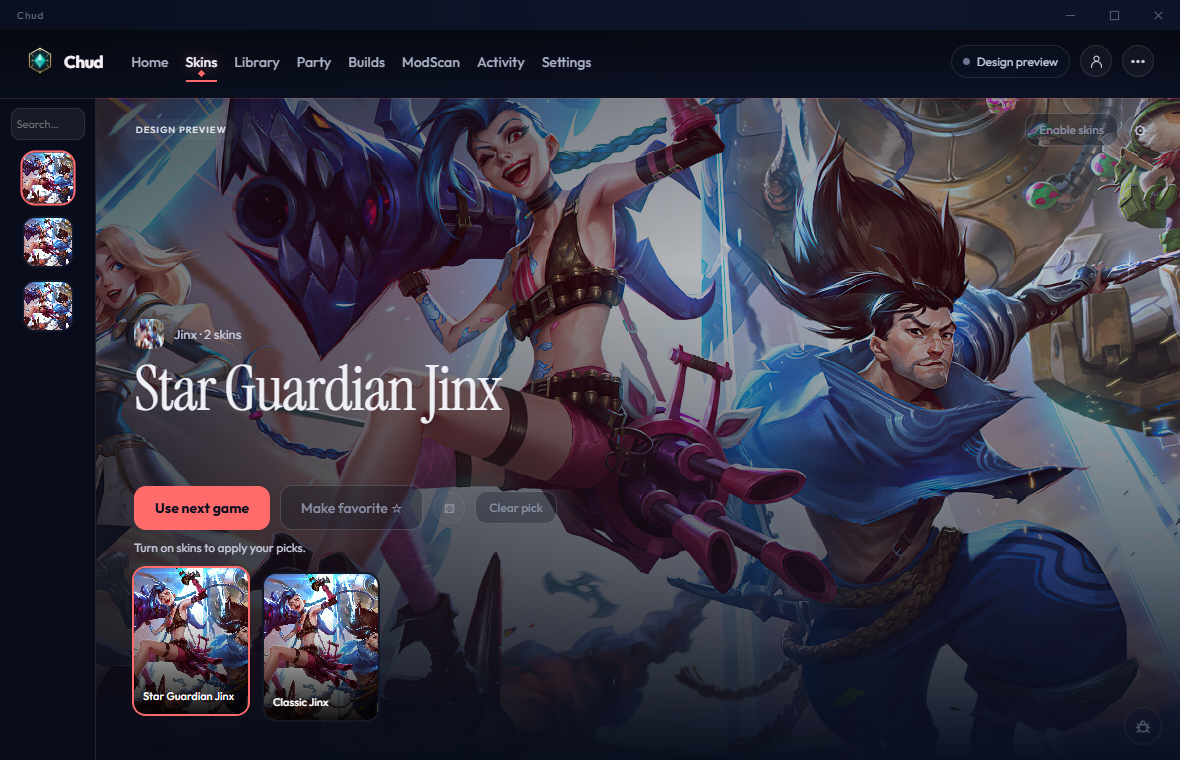
Pick skins right in League's own skin carousel in champ select: locked skins show unlocked, and custom skins, chromas and forms are there too. Chud confirms each pick, so it sticks. Chud's panel covers maps, announcers, fonts and other cosmetics. Favorites and recent selections persist across sessions.
02
Next-game picks
Choose a champion's skin and chroma while League is connected, then queue it for the next game on that champion. Queued picks survive restarts and dodges.
03
Skin Library
Browse community mods, install existing packs and manage updates.
04
ModScan
Inspect archive structure and contents before Library installation, with optional hash-only reputation checks. Scan installed or local mods on demand.
05
Party sync
Share cosmetic selections with other Chud users in your lobby through signed room messages. Party mode has its own enable switch.
06
Queue tools, runes and builds
Accept ready checks and display your attack range during a match. Alt+I opens an Overlays panel in game to switch the match panel, skill hint and augment grades on or off. Optional rune and build imports for your selected champion, with checks before changing client state.
Announcer packs
Install an existing announcer pack from the Library and select it from the Announcer controls.
Client declutter
Hide store nudges, ads, and attention-nag badges.
Appear offline
Stay hidden on your friends list while you play.
Live profile
Rank, recent form, champ pool, and match history.
Lobby lookup
Your teammates in champ select, all ten players in game: level, rank, recent games and top champions, read from your own client.
Ranks in game
Solo rank on the loading screen and a rank chip on the Tab scoreboard, read from your own client.
Mod repair
Custom mods are checked and fixed against the installed game before they load, with the problems listed in the Library.
Auto pick and ban
Up to three champions per role and account. Never overrides a champion you picked yourself.
Account switching
Save Riot accounts and switch in about five seconds. Signing in stays in Riot's own window.
A closer look

More room for your game.

01 / 04
Skin selection

Pick skins right in League's own skin carousel: locked skins show unlocked, and custom skins, chromas and forms are there too. Maps, announcers, fonts and other cosmetics live in Chud's panel.

02 / 04
Next-game picks

Choose a champion's skin and chroma while League is connected, then queue it for the next game on that champion. Queued picks survive restarts and dodges.

03 / 04
Settings

Independent sections for Queue, Auto-Range, Skins, Builds, Party and App. Settings save as you change them.

04 / 04
Queue tools

Accept ready checks and display your attack range during a match.
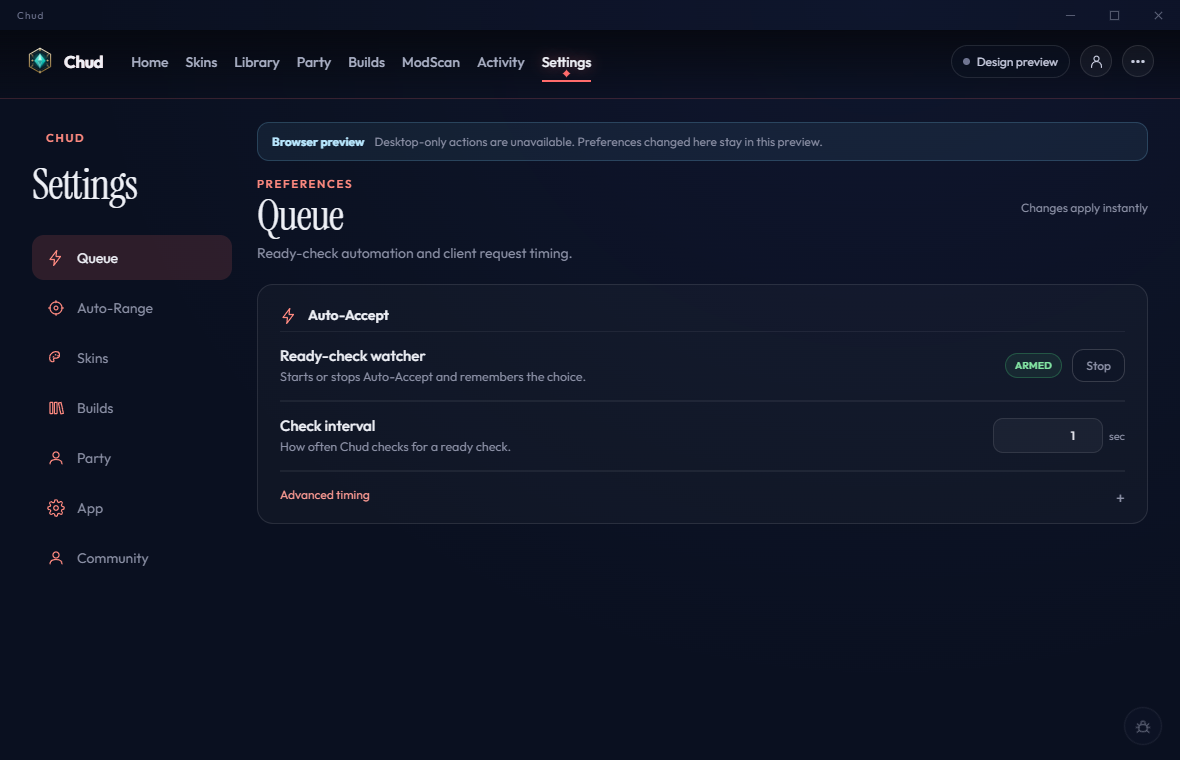
Chud skin selection interface in coral and navy Chud Settings with independent sections and queue controls

Screenshots from the current UI browser preview. Preview data is illustrative; game actions run in the Windows app.

Get started

Three steps. No setup wizard.

Chud finds your League client on its own. Settings save as you change them, and existing skin and announcer packs keep working.

01
Download the installer
Grab Chud-Setup.exe and run it. Updates install from inside the app afterward.
02
Launch Chud, then League
Chud discovers the local client automatically.
03
Turn on what you want
Enable skins, Auto-Accept, Auto-Range or Party sync. Everything else stays off.
How it works

Built in Rust, open to read.

Read the source on GitLab

Chud uses its own Tauri windows and the local League client API for selection and client features. The cosmetic game overlay uses cslol. Client API and game format changes can require compatibility updates.

Party signatures authenticate room messages; they do not prove ownership of a Riot account. A ModScan scan is a heuristic check, not a guarantee about every file.

The skin-changing engine began as Rose-Remastered by Alban1911. Chud is a Rust rewrite with heavy additions.

Also built on cslol / LeagueToolkit, the overlay and injection utilities that apply the skin to the game.

Your champion. Your screen.

Download for Windows Join the Discord